BIT-101
Bill Gates touched my MacBook Pro




After getting search working here (and on my other blogs), I was pretty excited. I started thinking, “what else can I do here?”
The one last thing I missed from leaving Wordpress was comments. I looked at a whole bunch of commenting systems. All the ones here: https://gohugo.io/content-management/comments/
I discovered that Hugo even has a Disqus comment template built in. I got that one working as a test, but didn’t like it visually at all, and honestly, just kind of had a bad feeling about Disqus in general. It didn’t help that Disqus wouldn’t even load if you have tracking prevention turned on.
I tried a few others, not much success. The one other one I got working also didn’t look good.
The rest were either paid services, which was a path I wasn’t going to go down, required extensive server side set up, or were tied to services I don’t use - Matrix, Discourse, github.
Then someone on Mastodon suggested I use Mastodon/Fediverse to handle comments. This was kind of in the back of my mind, but I didn’t really have a good idea how that would work. This post was given as a reference:
https://beej.us/blog/data/mastodon-comments/
This really clicked. Great post! The author built his implementation for his own private static site generator, which is impressive. I built mine for Hugo. The main thing I needed was the fact that given a Mastodon post ID, you can load all the info about that post as JSON. He was doing it with env vars and tokens in his source files that get replaced with the vars during the site build. I had some ideas on how I could do that a bit differently in Hugo. Anyway, with the knowledge from that post, I was off to the races.
Hugo has a heirarchy of templates and partial templates and markdown files with headers and params. I needed to figure out how to get all that in there.
This is straight up JS and HTML and CSS. I created a div and some JS to load and parse the JSON and turn it into styled HTML elements. I did all this at first in a simple HTML page, totally unconnected from my site.
<!DOCTYPE html>
<html>
  <head>
    <title>Comments</title>
    <link rel="stylesheet" href="styles/main.css">
  </head>
  <body>
    <h2>Comments!</h2>
    <div id="comments_div"></div>
    <script type="text/javascript" src="src/main.js"></script>
  </body>
</html>
And the JS that this loaded:
const id = "115939969899573885";

(async function load_comments() {
  const url = `https://mstdn.social/api/v1/statuses/${id}/context`;

  try {
    const response = await fetch(url);
    if (!response.ok) {
      throw new Error(`Response status: ${response.status}`);
    }
    const json = await response.json();
    populate_comments(json);
  } catch (error) {
    alert(`Error loading comments: ${error.message}`);
    console.error(error.message);
  }
})()

function populate_comments(json) {
  const commentsDiv = document.querySelectorAll("#comments_div")[0];
  const posts = json["descendants"];
  for (let i = 0; i < posts.length; i++) {
    const post = posts[i];
    const postDiv = document.createElement("div");
    postDiv.innerHTML = `<h3>${post.account.acct}</h3>${post.content}`;
    commentsDiv.appendChild(postDiv);
  }
}
The load_comments function was straight from the post above. The populate_comments part I just threw together. With a bit of styling copied over from this blog, I got this:
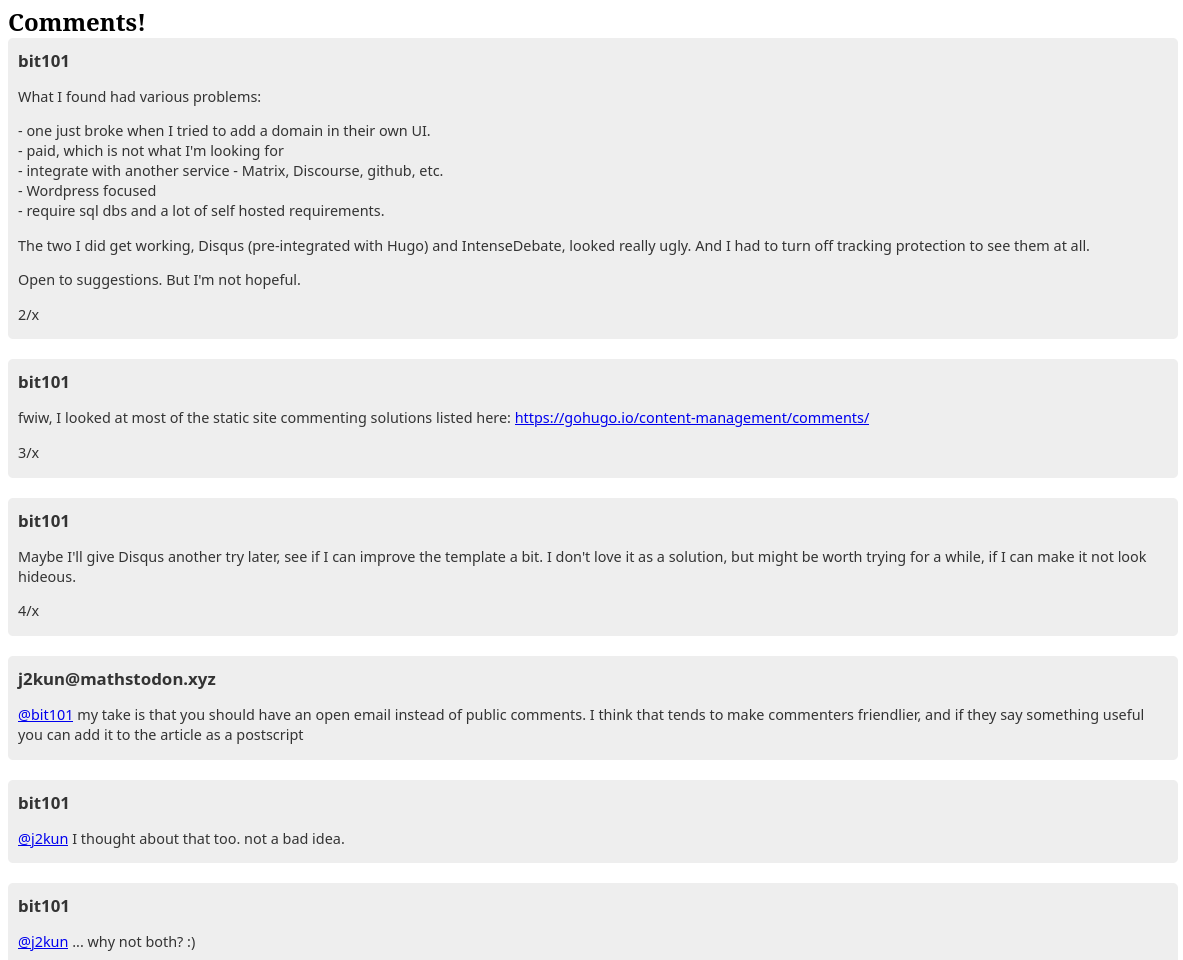
I was pretty happy with this as a proof of concept. Tested different post IDs and it was all good.
The one thing to note here is that it’s just displaying the responses to the original post I’m using. It doesn’t display that original post. But I fixed that later.
Onto the next step.
I couldn’t just hard code the Mastodon ID like that. It had to be tied to each individual blog post. In Hugo, each post or page has metadata in a header. You can add your own parameters there. Here’s the header of this very post:
---
title: "We Have Comments!"
date: 2026-01-22T20:06:00-05:00
draft: false
postImage: ""
summary: "OMG we have comments, via Mastodon!"
tags: ["info"]
mastodonId: "115941984813394822"
---
As you can see, I added a mastodonId parameter there. Now we have a bit of a catch-22 here. I need to create a Mastodon post about the blog post in order to get an ID to put in the blog post. But the Mastodon post needs to link to the blog post too!
So what I did was:
1. Created a private post on Mastodon, grabbed the ID and put it in the post.
2. Then finished the post, published it, and got the URL.
3. Finally, edited the Mastodon post, added the URL and made it public.
In all transparency, I’m writing this in past tense, but as I’m writing it I’ve only done the first step and I’m finishing the post now and hoping it all works out in the long run! But when you read it, it will all be in the correct tense. Messing with my head a little bit. And I’m hoping it works as expected.
That didn’t work. I guess you can’t turn a private Mastodon post into a public post. So for now there’s going to have to be a bit of back and forth.
mastodonIdIf anyone has an idea for a workaround for that, let me know.
This is done as a “partial”, which is just a partial HTML template that can be added to other HTML templates. Here’s the comments.html partial:
{{ if .Params.mastodonId }}
<h2>Comments!</h2>
<div id="comments_div">
  <a href="https://mstdn.social/@bit101/{{ .Params.mastodonId }}">Comment or read on Mastodon
    <img alt="mastodon icon" src="/blog/icons/mastodon.png" align="top" class="social-icon"/>
  </a>
</div>
<script type="text/javascript" src="/blog/js/comments.js"></script>
<script type="text/javascript">
  load_comments({{ .Params.mastodonId }});
</script>
{{ end }}
As you can see, it’s all in an if block, so if I don’t add a mastdonId to a post, no comment UI will show up at all.
This partial will be passed a context object that contains the metadata params I described above. So .Params.mastodonId will contain the ID I added. This gets passed to the load_comments function.
I updated the script that loads the comments. As mentioned earlier, loading the post context with https://<mastodon.server>/api/v1/statuses/<ID>/context gives you the data around a particular post - any posts it is a child of (ancestors) and any child posts of this post (descendants). But it doesn’t give you any info about the post itself. So I had to make two calls - one to load the initial post that I made, and another to load the descendents.
Here’s the final JS:
async function load_comments(id) {
  const contextURL = `https://mstdn.social/api/v1/statuses/${id}/context`;
  const postURL = `https://mstdn.social/api/v1/statuses/${id}`;
  try {
    const postJSON = await getJSON(postURL);
    const contextJSON = await getJSON(contextURL);

    populate_comments(postJSON, contextJSON, id);
  } catch (error) {
    console.error(error.message);
  }
}

async function getJSON(url) {
  const response = await fetch(url);
  if (!response.ok) {
    throw new Error(`Response status: ${response.status}`);
  }
  return await response.json();
}

function populate_comments(postJSON, contextJSON, id) {
  const commentsDiv = document.querySelectorAll("#comments_div")[0];

  // original post
  const postDiv = document.createElement("div");
  postDiv.innerHTML = `<h3>${postJSON.account.acct}</h3>${postJSON.content}`;
  commentsDiv.appendChild(postDiv);

  // replies
  const posts = contextJSON.descendants;
  for (let i = 0; i < posts.length; i++) {
    const post = posts[i];
    const postDiv = document.createElement("div");
    postDiv.innerHTML = `<h3>${post.account.acct}</h3>${post.content}`;
    commentsDiv.appendChild(postDiv);
  }
}
If anything goes wrong, I just log it to the console and carry on as if nothing had happened. The end user won’t be able to fix it anyway.
I wanted the comment section to go on any post that has a mastdonId. These are rendered with a template called single.html. Here’s the tail end of that:
    ...
    <a href="{{ .Page.Next.Permalink }}">Next Post »</a>
    {{ end }}
  </div>
</div>
{{ end }}

<hr/>

{{ partial "comments.html" . }}

{{ end }}
As you can see, at the end of the single page, I add a horizontal rule and then load the comments.html partial. The dot there is to pass the post context, which is how we get .Params.mastdonId passed to the partial and eventually the JavaScript.
I’m pretty excited about this. Again, I’m writing this like it’s already done, but as I wrap up this post, then I’ll be able to test it all live. Crossing fingers…
