Ubuntu and Me, Happy Together.
I tweeted today about this being my second full day on Ubuntu and it a bunch of responses from people wanting to know how I did this or that, what my experience was, etc. So here’s the story.
For a while, I’ve been wanting to set up a home server. For backups, file storage, and to learn a bit more about server administration and server side programming. It’s a big gap in my knowledge base. I also wanted to get back into Linux. I’d fist messed around with Linux back in the mid 90’s, downloading RedHat onto something like 18 floppy disks via a 14.4 modem in order to install it. Back in the good old days when you had to install your own window manager and configure it by editing config files. I know you can still do that, but back then it was the only way to do it. Finally, I wanted to get back into hardware. From my very first PC (after graduating from a Commodore 128 and Amiga 500) up until my first laptop, I had built all my own PCs from scratch. I’d start with some cheap or free used PC and upgrade it bit by bit until it was a nice machine. It would often wind up with some friend or family member and I’d start over.
The Linux portion of this whole thing got rekindled recently, in my switch over from MediaTemple to Dreamhost. I was messing with DNS settings and MX records and SSHing into both servers and running SQL queries to back up and restore this blog’s database, since it was too big to handle by the WordPress export/import system. I amazed myself with what I accomplished and learned in that whole process, and wanted to dive into it more.
So at some point a few weeks ago, I pulled up an old box I had rusting in the basement and tried to boot it up. Apparently it had rusted a bit too long and either the CPU or something on the board was fried. I went onto Amazon and bought a motherboard and cpu, along with some RAM, a 2 TB hard drive, and a DVD player/recorder. I had a bunch of unused gift certificate money on account, so it technically didn’t cost me a dime, but came to about $300 something total. The components trickled in and I sadly realized that I was the owner of a micro ATX case, and a full ATX motherboard. So back to Amazon for a nice case.
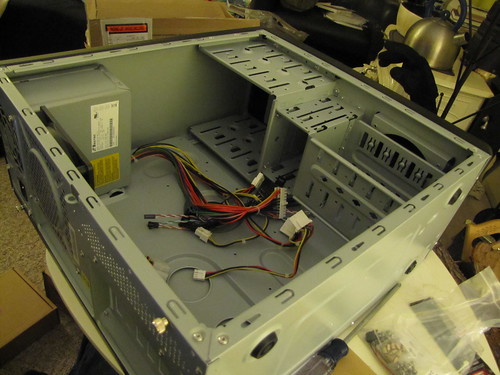
The case arrived and I realized that my power supply had only the IDE type connectors, no SATA connectors, which I needed for my drives. I picked up a new power supply locally and I was in business. Since then, I added a new fan, a fan control unit, and a memory card reader. Here’s the building in progress:
The empty case with power supply:
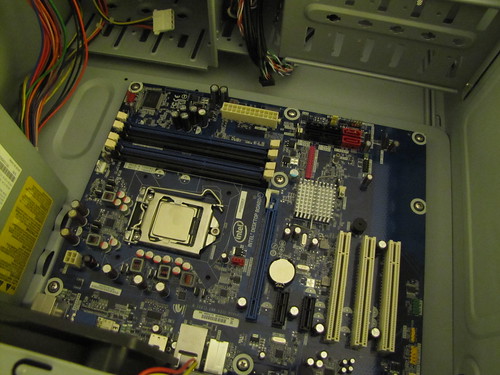
The motherboard installed:
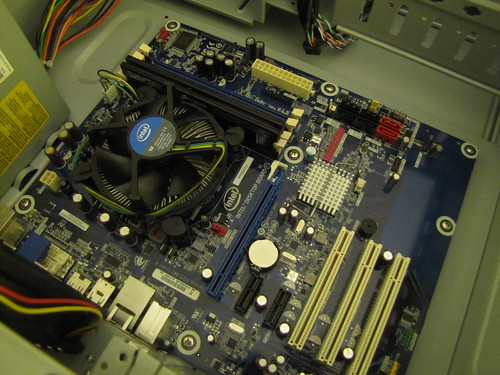
And the CPU and fan:
All the front panel stuff wired up:
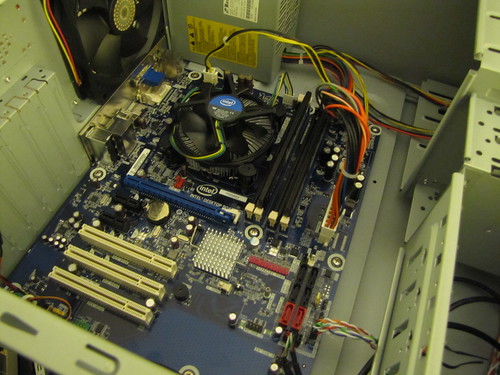
Everything in place:
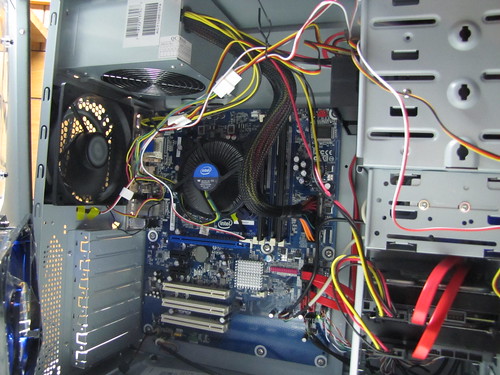
Wide shot:

Cover on:
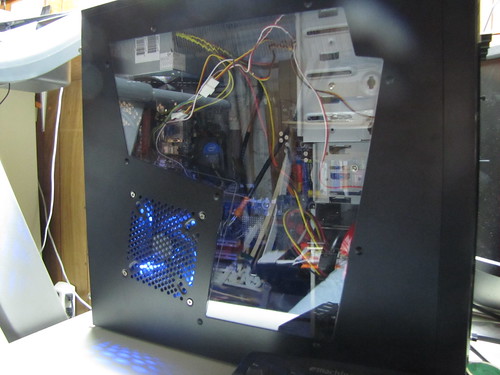
And a front view:

I had a real blast building this, shopping around for parts, learning about different boards and chips, formats and standards. Stuff that I’d forgotten a lot about. For those who are interested, the specs are:
MB: Intel Media Series ATX Motherboard BOXDH55HC
CPU: Intel Core i3 Processor i3-540 3.06GHz 4MB LGA1156 CPU BX80616I3540
RAM: Corsair 4GB Dual Channel Corsair DDR3 Memory for Intel Core i5 Processors (CMX4GX3M2A1600C9)
HD: Western Digital 2 TB Caviar Green SATA Intellipower 64 MB Cache Bulk/OEM Desktop Hard Drive WD20EARS
Case: Cooler Master RC-310-BWN1-GP Elite 310 ATX, MATX Mid Tower Case with Window (Black/Blue)
Fan Controller: Scythe “KAZE MASTER ACE " 5.25″ Bay Fan Controller- Black (KM02-BK)


Not a top of the line system, but decent enough, with lots of room to grow.
Software
Now that I had a box up and running, time to install some stuff. I went with Ubuntu 10.10. Installed VirtualBox and pulled out my old Windows install disks and set that up with Windows 2000, Windows XP, and Windows 7. The first two, mostly just because I could, and because I have 2TB of disk space to play with. Actually 3TB, because I salvaged another 1TB drive out of another device I wasn’t using.
I opened up ports for VNC, SSH, and HTTP, and set it up with www.dyndns.com so now I can access the machine from anywhere and do just about anything with it. Really having a blast exploring all the options.
Back to Ubuntu
All right, this is what I started to write about in the first place. I really enjoyed using Ubuntu on my server. I sat up in the living room SSHed or VNCed into the server, exploring stuff, installing new programs, finding out what I could do. It was great, but VNC is VNC. I set up VirtualBox on my PC and ran it from there as well. After a couple of weeks of doing both, I decided to make the jump to a full dual boot Ubuntu system. That’s what I did over this past weekend. It went very smoothly. I now had a dual boot system that defaults to Ubuntu, but also has Windows 7 as an option.
My next goal was to see if I could use Ubuntu full time as my main OS. For playing around, it was just fine, but if I was going to use it day in and day out, I needed to have a bunch of stable, viable, usable applications for doing all my day-to-day stuff. What amazed me was just how many of the apps I use on a regular basis have Linux versions. I don’t mean similar apps that do the same basic thing, but actual Linux versions of the exact same programs.
For example, I use Launchy as a task launcher, RapidSVN as an SVN UI, Tweetdeck for twitter, KeepassX for passwords, Skype for … Skype. all of these have Linux versions that I was able to install right off the bat. Made me feel quite at home and comfortable.
I’ve been making heavy use of Google Apps, having switched over my BIT-101.com email to Google apps. So mail, calendar, RSS, and documents were a no brainer and completely seamless. Chrome works fine on Ubuntu, too. With all that down, I felt I was almost able to make the switch. The big thing was going to be Flash/Flex/AIR development.
Obviously, CS5 does not exist on Linux yet. Nor does Flash Builder. But the Flex SDK and MXMLC works just fine there. You just need something to write your code in. There were two main choices – FDT and IntelliJ Idea. Both of which I happened to have licenses for. While IntelliJ is pretty awesome, it’s so different from Flash Builder, which I am used to, that I found it hard to really get comfortable with. FDT is Eclipse-based, like Flash Builder. The devil you know… as the old saying starts. So I decided to go with FDT.
Getting it set up was fairly easy, and I was hello worlding before I knew it. But the project I’m in the middle of presented a much bigger challenge – not a straight AS3 web project, but a Flex based, full screen AIR application that will be deployed on a kiosk. If I could get this going with FDT on Linux, I was home free. Some serious problems lay ahead. One was that I needed a debug player for 64 bit Linux. I dug one of those up somewhere – maybe labs? Then I was having problems with my embeds. Something is handled different on Windows and Linux with paths. I finally figured out I just needed to add a “../” in front of the embedded asset path. Not sure why it’s different. But that path works in both Windows and Linux, so it’s probably the “right” way. Next up was run/debug configurations. In FDT, if you are editing any class and you do a run or debug, it will create a run/debug configuration with that class as the main application. This is very different than Flash Builder, where you set the main application class and it will always use that. I finally worked through a couple of tutorials on the FDT site that straightened me out. Basically, you need to create your own configuration, and then, in preferences set Eclipse to always use the last configuration if one is unspecified. Handled.
The final problem was with AIR. All kinds of weird errors going on there. But no AIR file launching. After much searching, I finally realized that AIR SDK that you get when you download a Flex SDK is only good for Mac and PC. You have to go here and download the AIR SDK for Linux. I’m not sure how you are supposed to integrate the two of these things, but what I did was to go into the bin folder of my flex sdk folder, and remove adl, adl.exe, adt, and adt.bat, and replace them with the adl and adt files from the linux sdk. This is probably a very half-assed solution, but it actually worked. If anyone has any more robust directions, let me know, but with all of the above, I am now compiling and debugging my app without a hitch. I’ve also got MinimalComps compiling its swc using FDT, and the next release will be produced that way.
As for the time line on all this, I started trying to compile the app on Monday morning, but ran into all the problems mentioned above, so had to retreat back to Windows so I could get some work done for the day. I went home Monday night and worked through all the solutions I just mentioned. Tuesday I went to work and booted up Linux and haven’t looked back. That’s two full, very productive work days on Ubuntu alone, building a Flex based AIR app. I’d call that a success. I’ll definitely be finishing out the week on Ubuntu and heading into the sunset with it. 🙂
A bunch of people on twitter asked me about Flash, Photoshop, and the Creative Suite in general. The answer is that I don’t use Flash CS5 all that much. Well, actually I do use it fairly often, but not for long periods. I’ll fire it up to test out some snippet of code or spike out some idea. it’s great for that. But once the idea moves into something serious, it always gets moved into a more serious development environment. I will kind of miss that. Currently I’m looking into wonderfl.net to fill that gap. I’m not saying this is a solution for everyone. If you do a lot of timeline or library stuff, you really need Flash. For me, I just need a way to fire up something and lay down some fast code and see what it does without creating a workspace, package, classes, etc. wonderfl may serve that purpose in many cases.
As for graphics stuff, I haven’t run into a need for that yet in the last few days. Fireworks has been my weapon of choice for several years. I’m not sure what my solution will be for that yet. Naturally, when you think “Linux” and “graphics”, you think “Gimp”. It’s been years since I touched that, but I imagine when the need arises, I’ll look at it again, and then look around to see what else is out there too.
There’s also the possibility of running Windows on VirtualBox and installing CS5 in there. I think VirtualBox is great for some stuff, but large, resource heavy programs like Flash and Photoshop… the idea of those running in a VM scares me. I’ve tried running Visual Studio 2010 for Windows Phone stuff there, and it’s pretty slow. Also the Windows Phone emulator refuses to work in VirtualBox. An emulator in a virtual machine… go figure. Then there’s Wine, which may be able to run Some CS programs. I can’t speak for how successful that might be. My bottom line thought is that if you are REALLY dependent on Creative Suite programs and use them heavily day to day, Ubuntu is not the OS for you. You’re just setting yourself up for frustration.
On the PC I’ve been using Putty for SSH and TightVNC for VNC. Ubuntu has SSH and VNC capabilities built in, so that was easy. For IM, I’m using the built in Empathy client, which seems to handle my multitude of IM accounts perfectly well. Finally, you can’t work without some sounds of one kind of another emerging from your computer and into your ear holes. I go back and forth between podcasts and music. Ubuntu has RhythmBox preinstalled. It’s OK, but I’ve been checking out others. I’m pretty happy with Banshee at the moment, but will probably keep exploring.
After just two days, I’m already looking at editing my partitions to give Ubuntu some more room, and moving more of my files over to the Linux side. I need to keep the dual boot setup at least for my Windows Phone development, as I have one project half done, and will probably do some more stuff with that. And it’s just not happening virtually.
At any rate, as I also mentioned on twitter, if you are a professional developer, you really need to have access to a Windows box and a Mac, one way or the other, virtual or physical. I think any professional developer who bitches about this or that operating system or platform or language or device and sticks to one single platform, refusing to touch anything else is childish and unprofessional. At the very least, it’s a pretty poor long term career attitude. Learn more. Experiment. Try something new. You’ll be a better person for it. It’s fine to be an expert in a specific area, but don’t paint yourself into a coffin. (you like that one?) In addition to my home server and my dual boot laptop, I have a Mac book at home and a Mac book pro at work, both plugged in and ready to go. I have three fully charged phones within arms reach – my iPhone, Nexus One, and Samsung Focus (WP7). I don’t like to get too comfortable with any one thing. I feel like I’m stagnating. I used my Windows Phone for the last 3 months. Now i’m carrying the iPhone again, just for a change. What makes you more valuable – the fact that you can make a good snide remark about how much platform X sucks as compared to the platform you use? Or the fact that you can sit down and be comfortable and productive in any platform? Which makes you feel more confident?
Sorry. Got a little preachy there. Just get tired of hearing about technology wars when there is so much awesome and exciting stuff to learn and play with. Now more than ever. End of rant. Try Ubuntu. You might like it.